
Social Mockup
- Format
- Static
- Category
- Native & UI Mimicry
- Stage
- TOF
- Requires
- Prompt only
What is it
An ad dressed in a familiar platform interface, like an Instagram Story, an X thread, a Facebook comment, or a Slack channel, with the product placed inside as a post, reply, or message. People lower their guard for posts and raise it for ads, so the platform frame gets past banner blindness. The likes, comments, and replies do the actual selling by showing a crowd that's already bought in. A viewer who sees the room already agreeing tends to join it.
What makes it work
Fill the shell with people
A flawless platform mockup with no reaction count, no commenter, and no replies is just an ad in a costume. The frame gets attention, and the visible crowd inside it persuades. Populate it or don't use the format.
Pick the platform your buyer actually uses
Instagram for beauty, wellness, and lifestyle. X for opinionated, scarcity-driven products. Facebook for older audiences and comment-driven proof. Slack or Teams for B2B. The frame only works if it's the feed they scroll every day.
Choose who starts the conversation
A coworker asking reads as peer validation. A boss asking "how did you finish this so fast?" reads as status. A parent buying for their teenager lands differently than a first-person review. The person the proof comes from is a lever to test.
Use specific, believable numbers
"1,247 reactions" reads as something that happened. "2.3M likes" reads as made up and brings back the skepticism the format was meant to get around.
Keep the UI slightly plain
Real platforms are a bit imperfect. An overly branded, polished recreation looks designed and loses the native feel. Raw often beats polished, especially in Stories.
Show the proof first and the product last
The question, the comment, and the reaction count come first. The product, link, or brand name comes after the crowd has already made it feel wanted.
Reference 1
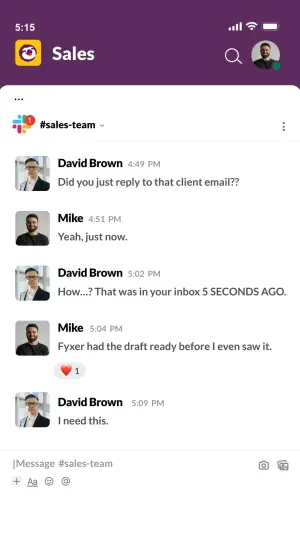
AI Edit Master Prompt
Using the attached image as the layout reference: keep the mobile Slack layout with a purple status bar and header showing a workspace icon, a channel name, a search icon and a profile photo, a channel label beneath, and a thread of five messages alternating between two users, each with a square profile photo, a bold name, a grey timestamp and one short line of text, with a single red heart reaction and count under the fourth message. Keep the empty message input bar with formatting icons at the bottom. Replace the profile photos with {TWO COWORKERS}. Set the header to "{THE TEAM NAME}", the channel to "{#CHANNEL}", the names to "{COWORKER 1}" and "{COWORKER 2}", and the messages to "{THE SURPRISED QUESTION}" / "{THE CASUAL ANSWER}" / "{THE DISBELIEF}" / "{THE ANSWER NAMING YOUR PRODUCT}" / "{THE CONVERSION LINE}".Reference 2
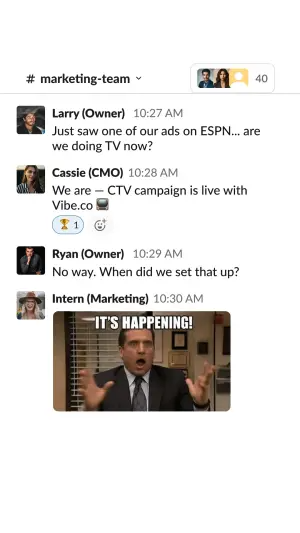
AI Edit Master Prompt
Using the attached image as the layout reference: keep the white Slack desktop layout with a channel name and a stacked member avatar group with a count in the top right, and a thread of four messages, each with a square profile photo, a bold name with the job title in brackets, a grey timestamp and a short message, with a small trophy reaction under the second message and a reaction GIF as the final message. Replace the profile photos with {FOUR TEAM MEMBERS} and the GIF with {YOUR OWN REACTION GIF OR IMAGE}. Set the channel to "{#CHANNEL}", the names to "{FOUR NAMES AND ROLES}", and the messages to "{THE BOSS NOTICES THE RESULT}" / "{THE ANSWER NAMING YOUR PRODUCT}" / "{THE FOLLOW-UP QUESTION}".Reference 3
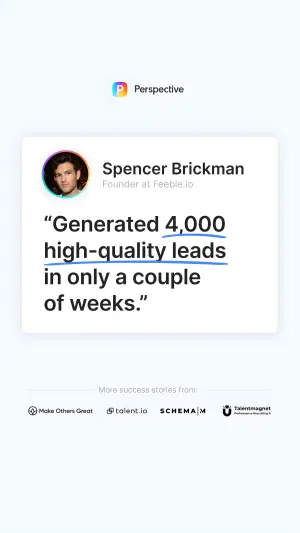
AI Edit Master Prompt
Using the attached image as the layout reference: keep the pale rounded card with a circular profile photo on the left, a bold name and role beneath it, a large underlined testimonial quote in the centre, a row of four small client logos at the bottom, and a small centred wordmark above the card. Replace the profile photo with {YOUR TESTIMONIAL GIVER} and the four logos with {YOUR CLIENT OR PARTNER LOGOS}. Set the wordmark to "{YOUR BRAND}", the name to "{TESTIMONIAL GIVER NAME}", the role to "{THEIR TITLE / COMPANY}", and the quote to "{THE UNDERLINED TESTIMONIAL}".Reference 4
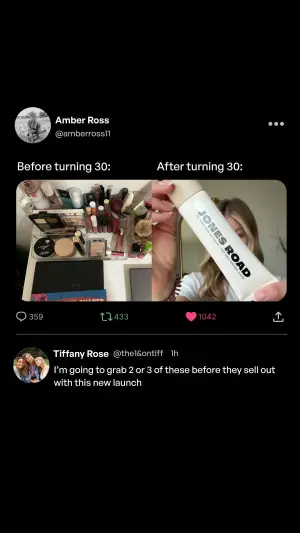
AI Edit Master Prompt
Using the attached image as the layout reference: keep the black X dark-mode layout with a circular profile photo, a bold name and handle, and a menu icon at the top, a two-part caption across the top of the image, a single photo split in two: a cluttered pile of products on the left and a person holding the product up on the right, and a row of reply, repost, like and share icons with specific counts. Keep one reply below with a profile photo, name, handle, time and a two-line message. Replace the photo with {THE CLUTTERED BEFORE} and {YOUR PRODUCT AFTER}. Set the poster to "{POSTER NAME AND HANDLE}", the caption to "{BEFORE LABEL}" / "{AFTER LABEL}", the counts to "{THREE SPECIFIC COUNTS}", and the reply to "{THE SCARCITY REPLY}".Reference 5
AI Edit Master Prompt
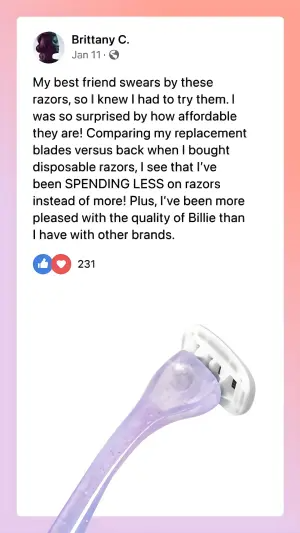
Using the attached image as the layout reference: keep the peach-to-lilac gradient background, a large white rounded Facebook post card with a circular profile photo, a bold name, a date with a globe icon, a long paragraph of review text with one phrase in caps, a like and heart reaction pair with a specific count, and a product photo placed in the lower right of the card. Replace the product with {YOUR PRODUCT} and the photo with {YOUR REVIEWER}. Set the name to "{REVIEWER NAME}", the date to "{THE DATE}", the review to "{THE PERSONAL STORY}", the caps phrase to "{THE KEY BENEFIT}", and the count to "{REACTION COUNT}".Reference 6
AI Edit Master Prompt
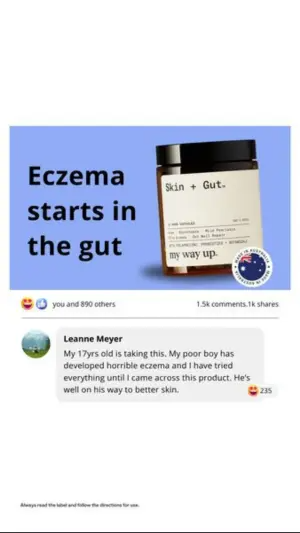
Using the attached image as the layout reference: keep the white background with a Facebook post image in the upper half: a light blue panel with a bold three-line headline on the left, the product jar on the right, and a round badge in the corner. Below it, keep the reaction bar with "you and [number] others" on the left and comment and share counts on the right, a highlighted comment with a circular profile photo, a bold name, a grey bubble with a multi-line emotional review and a small reaction count, and a tiny disclaimer line near the bottom. Replace the product with {YOUR PRODUCT} and the badge with {YOUR TRUST BADGE}. Set the headline to "{THE ROOT-CAUSE CLAIM}", the counts to "{REACTION, COMMENT AND SHARE COUNTS}", the commenter to "{COMMENTER NAME}", the review to "{THE REVIEW FROM THE BUYER PERSONA}", and the disclaimer to "{THE SMALL PRINT}".Reference 7
AI Edit Master Prompt
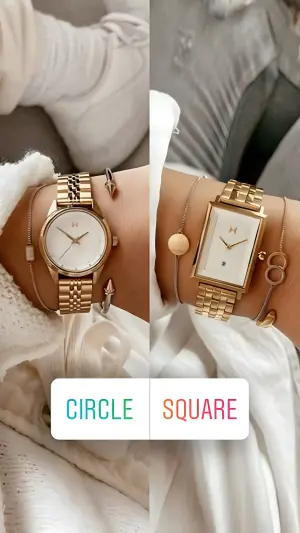
Using the attached image as the layout reference: keep the full-screen Instagram Story split into two cosy close-up photos side by side, each showing a wrist wearing a different product variant with stacked bracelets and soft knit sleeves, and a white rounded poll sticker across the lower third with two options in gradient caps text separated by a thin divider. Replace the photos with {VARIANT A IN USE} and {VARIANT B IN USE}. Set the poll options to "{OPTION A}" and "{OPTION B}".Reference 8
AI Edit Master Prompt
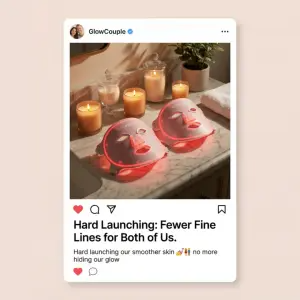
Using the attached image as the layout reference: keep the soft neutral background, a white Instagram post card with a circular profile photo, a bold account name with a blue verified check, a warm lifestyle photo of two products on a marble surface surrounded by lit candles and a small plant, the like, comment, share and save icon row, a bold two-line caption headline, a short line of caption text with emojis, and a small heart and comment icon beneath. Replace the products and scene with {YOUR PRODUCT IN A LIFESTYLE SCENE}. Set the account name to "{THE ACCOUNT}", the headline to "{THE ANNOUNCEMENT}", and the caption to "{THE CASUAL CAPTION}".Reference 9
AI Edit Master Prompt
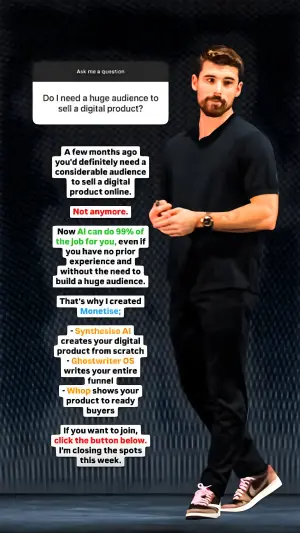
Using the attached image as the layout reference: keep the dark stage photo of a presenter standing on the right, a white Instagram Q&A sticker in the top left with a small "Ask me a question" label and a bold question, and a long stack of short white text boxes down the left side, with a few words coloured red, green, blue or orange for emphasis and a bulleted list of tools near the bottom. Replace the presenter with {YOU OR YOUR EXPERT}. Set the question to "{THE AUDIENCE QUESTION}", the text boxes to "{THE ANSWER STACK}", the coloured words to "{THE KEY PHRASES}", the list to "{THREE THINGS INCLUDED}", and the last box to "{CTA WITH DEADLINE}".Reference 10
AI Edit Master Prompt
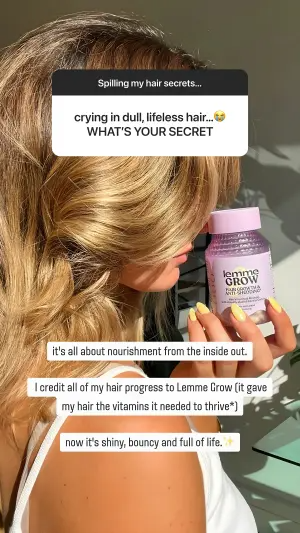
Using the attached image as the layout reference: keep the sunlit close-up photo of a person with thick, shiny hair holding the product bottle up near their face, a white Instagram Q&A sticker at the top with a small label and a bold two-line question with an emoji, and three white rounded text boxes stacked in the lower half, the last one ending with a sparkle emoji. Replace the bottle with {YOUR PRODUCT} and the person with {YOUR CREATOR}. Set the label to "{THE STICKER PROMPT}", the question to "{THE FOLLOWER QUESTION}", and the boxes to "{THE REASON}" / "{THE CREDIT TO YOUR PRODUCT}" / "{THE RESULT}".