
Product Grid
- Format
- Static
- Category
- Product Showcase
- Stage
- MOF
- Requires
- Product photo
What is it
An ad that shows the whole range at once — every color, every shade, the full set — in one frame: a clean grid, a gradient lineup, a flat-lay, or a collage. A single hero shot asks the viewer to like the one you picked. A grid lets them find their own, and once their eye has settled on "that one," they've gone from scrolling to choosing before they click.
What makes it work
The volume stops the scroll
The eye clocks the quantity, the symmetry, or the color gradient before it reads a word. Line variants up so the colors flow, and the pattern does the hook's job for you.
Let the viewer make the pick
Every variant has to be clear enough to choose from. If a color is cropped, hidden in shadow, or indistinguishable from its neighbor, you've removed the one moment the format depends on.
Stop before paralysis
Six options invite a choice; sixty build a wall. Grid size is the first thing to test, because there's always a point where more options stop helping and start freezing people.
Pick the layout for the pull you want
A clean grid sells "find your color," a gradient sells visual satisfaction, on-model panels and collages sell "see it worn," a set or box sells "look how much you get," and an app-style mockup sells "which one fits my need."
Give the range a reason with the headline
A discount, a review, an identity question ("What's your personality?") or a fit claim tells the viewer why the choice matters. Without it, the grid is a nice catalog page.
Product state is a lever, not a detail
Open or closed, wet or matte, worn or flat, studio or lifestyle: each version shows off a different quality of the same lineup. Same products, different texture, different message.
Reference 1
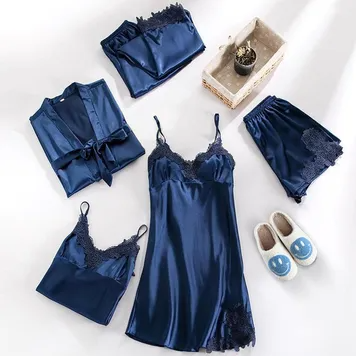
AI Edit Master Prompt
Using the attached image as the layout reference: keep the top-down flat-lay on a clean white surface with soft natural shadows, and the full matching set arranged loosely around the frame — a robe folded with its belt tied on the left, folded trousers at the top, a camisole in the bottom left, a slip dress in the centre, shorts on the right — plus a small woven basket with a tiny plant in the top right and a pair of fuzzy slippers in the bottom right. Keep the image free of text. Replace the clothing with {YOUR PRODUCT SET} and the props with {YOUR LIFESTYLE PROPS}.Reference 2
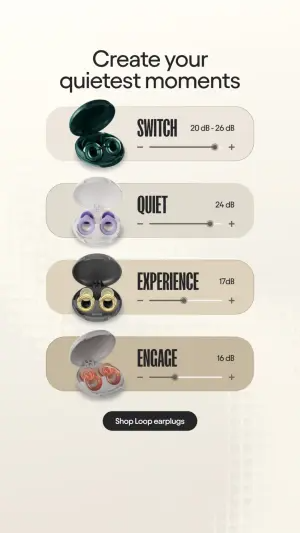
AI Edit Master Prompt
Using the attached image as the layout reference: keep the warm off-white background with a faint grid texture near the bottom, a centred two-line headline, four stacked pill-shaped cards in beige tones, each with an open product case on the left, a bold condensed caps name in the middle, a small spec value in the top right and a slider with minus and plus signs beneath, and a small dark rounded button at the bottom. Replace the cases with {YOUR FOUR VARIANTS}. Set the headline to "{THE OUTCOME}", the names to "{FOUR VARIANT NAMES}", the values to "{FOUR SPEC VALUES}", and the button to "{CTA}".Reference 3
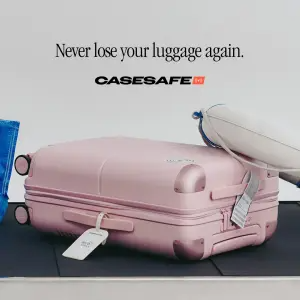
AI Edit Master Prompt
Using the attached image as the layout reference: keep the light grey wall background, a one-line serif headline across the top, a bold wordmark logo with a small colored badge beneath it, and the product lying flat on a black baggage carousel with a tag hanging from its handle, a travel pillow resting on the top right and the edge of another bag on the left. Replace the suitcase with {YOUR PRODUCT} and the logo with {YOUR LOGO}. Set the headline to "{THE PROBLEM SOLVED}".Reference 4
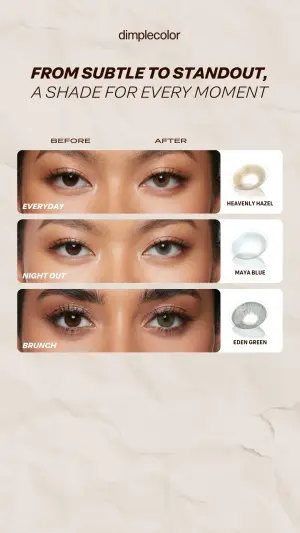
AI Edit Master Prompt
Using the attached image as the layout reference: keep the textured off-white paper background, a small lowercase logo at the top, a bold italic caps two-line headline, small "BEFORE" and "AFTER" labels above three stacked rounded panels of close-up eye crops, an italic caps occasion label in the bottom left of each panel, and a white card beside each panel showing the product render with a small caps variant name. Replace the eye crops with {YOUR BEFORE AND AFTER RESULTS}, the renders with {YOUR THREE VARIANTS}, and the logo with {YOUR LOGO}. Set the headline to "{THE RANGE PROMISE}", the occasion labels to "{THREE OCCASIONS}", and the variant names to "{THREE VARIANT NAMES}".Reference 5
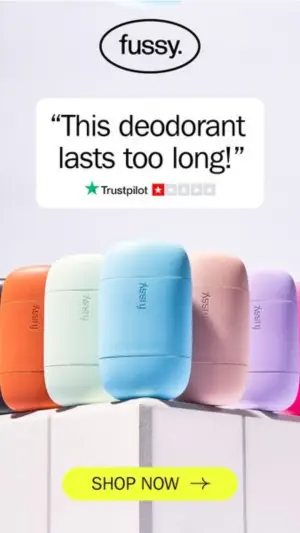
AI Edit Master Prompt
Using the attached image as the layout reference: keep the light lilac background, a logo inside a black outlined oval at the top, a white rounded box holding a large quote with a star rating line beneath, five matte pill-shaped products in pastel colors standing in a slightly angled row on a white stepped ledge and cropped at the edges, and a bright yellow-green rounded button with an arrow at the bottom. Replace the products with {YOUR PRODUCT IN FIVE COLORS} and the logo with {YOUR LOGO}. Set the quote to "{THE REVIEW}", the rating line to "{THE RATING}", and the button to "{CTA}".Reference 6
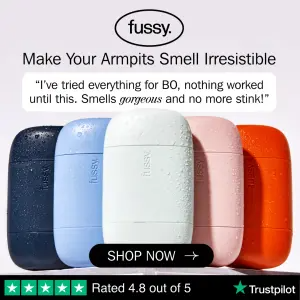
AI Edit Master Prompt
Using the attached image as the layout reference: keep the pale grey background, a logo inside an outlined oval at the top, a bold one-line headline, a white rounded box with an italic quote where one word is set in script, five pill-shaped products in navy, light blue, white, pink and orange standing side by side and covered in realistic water droplets, a black rounded button overlapping their lower edge, and a green review bar with stars and a rating line along the bottom. Replace the products with {YOUR PRODUCT IN FIVE COLORS} and the logo with {YOUR LOGO}. Set the headline to "{THE BENEFIT}", the quote to "{THE REVIEW}", the button to "{CTA}", and the review bar to "{THE RATING}".Reference 7
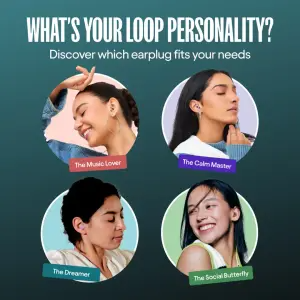
AI Edit Master Prompt
Using the attached image as the layout reference: keep the dark teal gradient background, a large bold white caps headline, a smaller white subheadline, a 2x2 grid of circular portraits of different people using the product, and a colored, slightly tilted label tag beneath each portrait. Replace the portraits with {YOUR CUSTOMERS USING EACH VARIANT}. Set the headline to "{THE IDENTITY QUESTION}", the subheadline to "{THE PROMISE}", and the labels to "{FOUR PERSONAS}".Reference 8
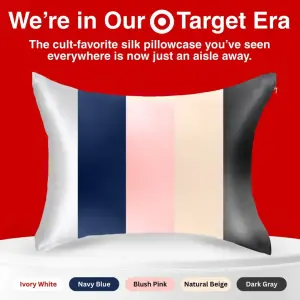
AI Edit Master Prompt
Using the attached image as the layout reference: keep the vibrant red background, a bold two-line white headline with a logo set inline, a bold white subheadline, a single product split into five vertical color stripes resting on a white podium, and a row of five pill-shaped swatch labels below, each filled with its matching color. Replace the product with {YOUR PRODUCT} and the inline logo with {YOUR LOGO}. Set the headline to "{THE ANNOUNCEMENT}", the subheadline to "{WHY IT MATTERS}", and the labels to "{FIVE COLOR NAMES}".Reference 9
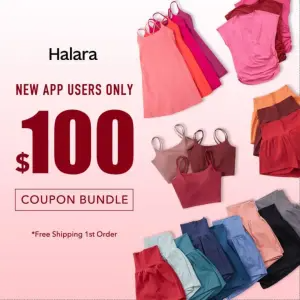
AI Edit Master Prompt
Using the attached image as the layout reference: keep the soft pink gradient background, a left-aligned text column with a small logo, a red caps line, a huge red offer number, an outlined box with caps text and a small footnote beneath, and fanned stacks of clothing in reds, pinks, blues and greens framing the right side and bottom edge. Replace the clothing with {YOUR PRODUCT RANGE} and the logo with {YOUR LOGO}. Set the caps line to "{THE AUDIENCE}", the number to "{THE OFFER VALUE}", the boxed text to "{THE OFFER TYPE}", and the footnote to "{THE SMALL PRINT}".Reference 10
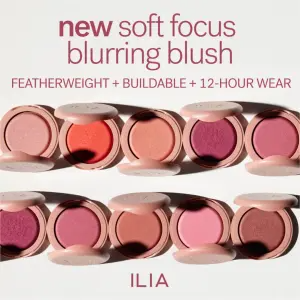
AI Edit Master Prompt
Using the attached image as the layout reference: keep the clean white background, a two-line headline at the top with the first word bold in color, a caps line of benefits joined by plus signs, two rows of five open compacts with their lids tipped back showing a shade gradient from light to deep, and a caps logo centred at the bottom. Replace the compacts with {YOUR PRODUCT IN TEN SHADES} and the logo with {YOUR LOGO}. Set the headline to "{THE LAUNCH}" and the benefits line to "{THREE BENEFITS}".Reference 11
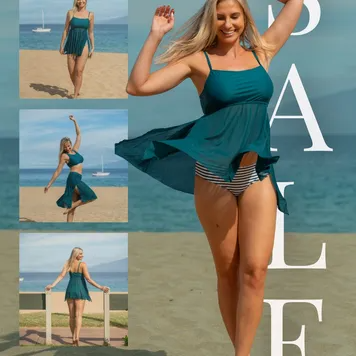
AI Edit Master Prompt
Using the attached image as the layout reference: keep the asymmetrical photo collage with a narrow left column of three stacked smaller photos of the same model on a beach in different poses, and a large right panel with a full-length shot of her mid-movement, her outfit caught in the breeze, against a soft sea and sky. Keep the tall, slightly transparent white serif letters running vertically down the right edge, partly overlapping the model. Replace the model's outfit with {YOUR PRODUCT} and the scene with {YOUR SETTING}. Set the vertical overlay text to "{ONE-WORD OFFER}".Reference 12
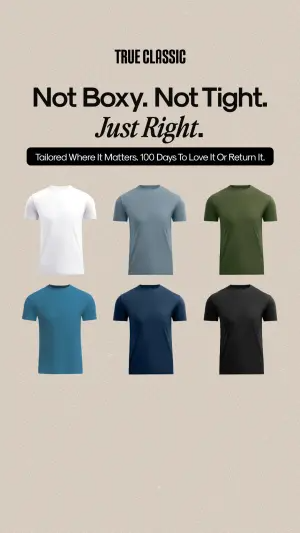
AI Edit Master Prompt
Using the attached image as the layout reference: keep the plain warm beige background, a small bold caps logo at the top, a large two-line headline where the second line is set in italic serif, a black rounded banner with a single line of white text beneath it, and a grid of six floating products in two rows of three, each in a different solid color. Replace the products with {YOUR PRODUCT IN SIX COLORS} and the logo with {YOUR LOGO}. Set the headline to "{THE FIT PROMISE}" and the banner to "{THE GUARANTEE}".Reference 13
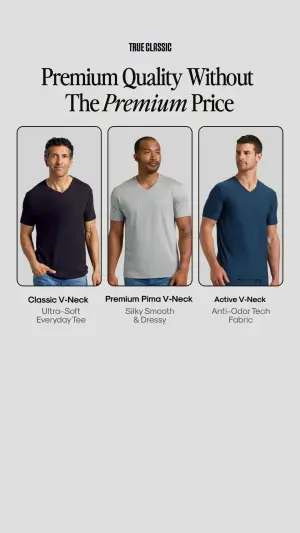
AI Edit Master Prompt
Using the attached image as the layout reference: keep the light grey background, a small bold caps logo at the top, a centred two-line serif headline with one word in italics, three tall rounded panels side by side, each showing a different model wearing the product in a different color against a plain grey backdrop, and beneath each panel a bold variant name with two lines of lighter descriptive text. Replace the models' clothing with {YOUR THREE VARIANTS} and the logo with {YOUR LOGO}. Set the headline to "{THE VALUE PROMISE}", the names to "{THREE VARIANT NAMES}", and the descriptions to "{THREE ONE-LINE BENEFITS}".