
Listicle (callout ads)
- Format
- Static
- Category
- Problem to Solution
- Stage
- TOF
- Requires
- Prompt only
What is it
A product sitting in the middle of the frame with labels pointing at it, each one answering a different doubt. It's a layout, not an argument: instead of making one case, it answers five objections at once so the viewer's list of reasons not to buy runs out.
What makes it work
Every label answers a doubt, not a spec sheet
Write the objection first, then the label that kills it. "Will they fall down?" becomes "Zero toe compression." A label that doesn't correspond to a real hesitation is filler.
Point at the actual part
Thin leader lines from the label to the exact place on the product. Vague floating text beside a photo doesn't read as a callout — the connection to the physical thing is what makes it feel like evidence.
Four to six labels
Three looks thin, eight becomes a wall nobody reads. You're aiming for "that's everything I was going to ask," not a spec dump.
Keep the product clean and centred
One clear hero shot with space around it for the labels. Busy backgrounds and callouts fight each other, and the labels always lose.
Distribute them around the frame
Labels on both sides, above and below, so the eye circles the product. Stacking them all down one side turns it into a bullet list with a picture attached.
Keep each label to two or three words
They're read in peripheral vision while the eye is on the product. A sentence never gets read.
Reference 1
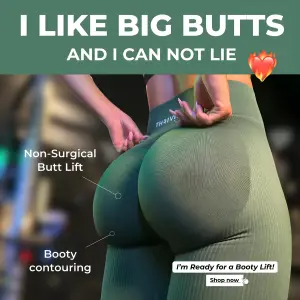
AI Edit Master Prompt
Using the attached image as the layout reference: keep the solid colour banner across the top with a bold caps headline and a smaller line beneath it, a close-up product-in-use photo filling the frame, thin white pointer lines from two labels on the left to specific parts of the product, and a small white button graphic in the bottom right. Replace the photo with {YOUR PRODUCT IN USE}. Set the headline to "{THE HOOK}", the labels to "{TWO BENEFITS}", and the button to "{CTA}".Reference 2
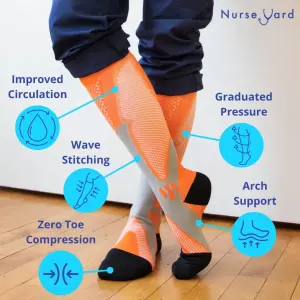
AI Edit Master Prompt
Using the attached image as the layout reference: keep the plain interior photo with the product worn centre-frame, the wordmark top right, and five labels distributed around the frame — each a short line of coloured text above a circular outlined icon, with a thin line pointing to the relevant part. Replace the photo with {YOUR PRODUCT WORN OR IN USE} and the accent with {YOUR BRAND COLOR}. Set the wordmark to "{YOUR BRAND}" and the labels to "{FIVE FEATURES}".Reference 3
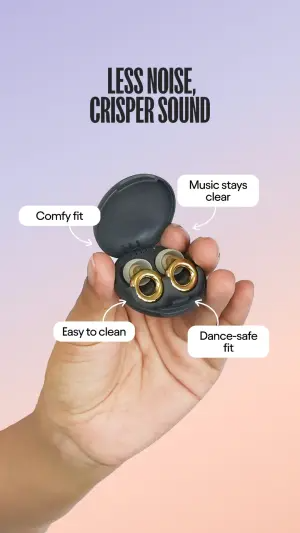
AI Edit Master Prompt
Using the attached image as the layout reference: keep the soft vertical gradient background, a bold caps two-line headline at the top, a hand holding the open product in the centre, and four white rounded label boxes floating around it, each with a thin curved line pointing to a specific part. Replace the product with {YOUR PRODUCT HELD IN HAND} and the gradient with {YOUR BRAND COLORS}. Set the headline to "{THE PROMISE}" and the labels to "{FOUR BENEFITS}".Reference 4
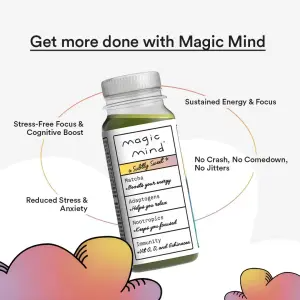
AI Edit Master Prompt
Using the attached image as the layout reference: keep the off-white background, an underlined headline across the top, the product standing in the centre inside a faint circular outline, four short labels placed around the circle at the corners, and soft illustrated shapes along the bottom edge. Replace the product with {YOUR PRODUCT}. Set the headline to "{THE PROMISE} with {YOUR BRAND}" and the labels to "{FOUR BENEFITS}".Reference 5
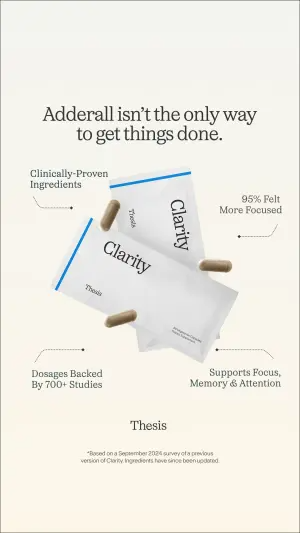
AI Edit Master Prompt
Using the attached image as the layout reference: keep the cream background, a centred serif headline at the top, the product floating at an angle in the middle of the frame, four labels in the corners each connected by a thin dashed line to the product, the wordmark centred below, and small legal text at the bottom. Replace the product with {YOUR PRODUCT}. Set the headline to "{THE POSITIONING}", the labels to "{FOUR PROOF POINTS}", the wordmark to "{YOUR BRAND}", and the footnote to "{YOUR DISCLAIMER}".Reference 6
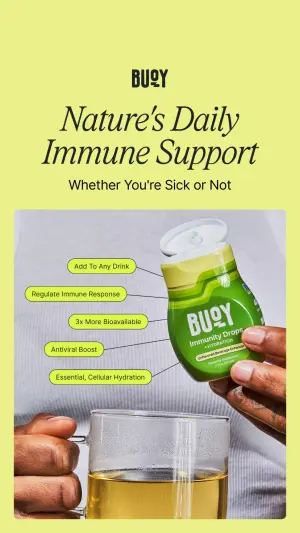
AI Edit Master Prompt
Using the attached image as the layout reference: keep the flat bright background, the wordmark top left, a serif headline and subline beneath it, a product-in-use photo filling the lower two thirds, and five small rounded label pills stacked down the left edge of the photo, each with a short line pointing to the product. Replace the photo with {YOUR PRODUCT IN USE} and the background with {YOUR BRAND COLOR}. Set the wordmark to "{YOUR BRAND}", the headline to "{THE PROMISE}", the subline to "{THE QUALIFIER}", and the pills to "{FIVE FEATURES}".Reference 7
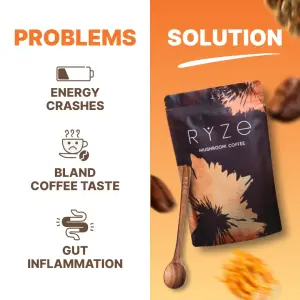
AI Edit Master Prompt
Using the attached image as the layout reference: keep the vertical split with a white left panel and a warm gradient right panel, "PROBLEMS" and "SOLUTION" headers across the top, three icon-and-label rows stacked down the left, and the product standing on the right with ingredients scattered around it. Replace the product with {YOUR PRODUCT}. Set the left rows to "{THREE PROBLEMS}".Reference 8
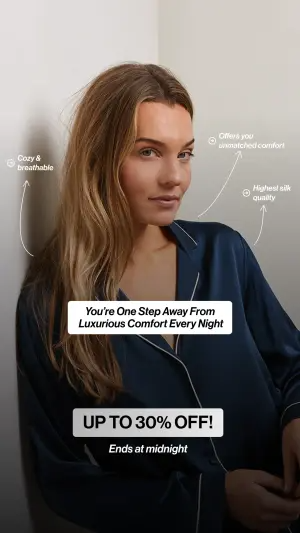
AI Edit Master Prompt
Using the attached image as the layout reference: keep the plain corner-wall photo of a person wearing the product, three small handwritten-style labels with thin curved arrows pointing at different parts of the garment, a dark rounded text banner over the centre, a large light offer banner below it, and an italic urgency line at the bottom. Replace the photo with {YOUR PRODUCT WORN}. Set the labels to "{THREE FEATURES}", the banner to "{THE PROMISE}", the offer to "{YOUR OFFER}", and the urgency line to "{THE DEADLINE}".Reference 9
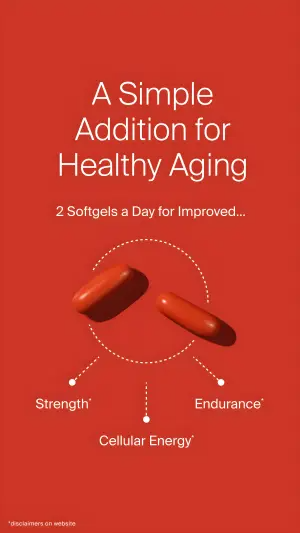
AI Edit Master Prompt
Using the attached image as the layout reference: keep the flat saturated background, a centred three-line headline at the top with a smaller line beneath it, the product floating in the middle, and three dotted lines fanning down from it to three labelled dots below. Replace the background with {YOUR BRAND COLOR} and the product with {YOUR PRODUCT}. Set the headline to "{THE PROMISE}", the subline to "{THE DOSAGE OR MECHANIC}", and the three labels to "{THREE BENEFITS}".Reference 10
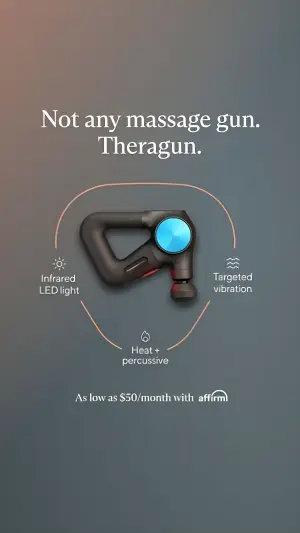
AI Edit Master Prompt
Using the attached image as the layout reference: keep the smooth dark gradient background, a two-line serif headline at the top with the brand name on the second line, the product floating in the centre, a thin curved arc drawn around it with three small icons sitting on the arc, a short two-line label beneath each icon, and a payment line at the bottom. Replace the product with {YOUR PRODUCT}. Set the headline to "{THE POSITIONING}", the labels to "{THREE FEATURES}", and the bottom line to "{FINANCING OR OFFER}".Reference 11
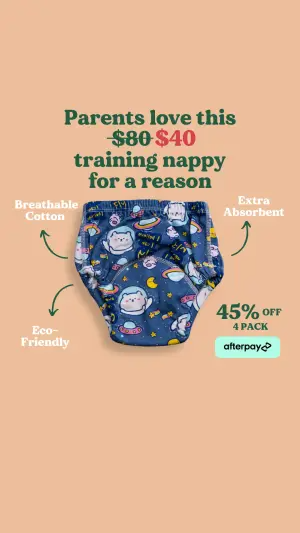
AI Edit Master Prompt
Using the attached image as the layout reference: keep the warm flat background, a centred serif headline across the top with a struck-through original price beside a red discounted price inside the headline text, the product cut out and floating in the middle, three short labels around it each with a hand-drawn curved arrow pointing at the product, a discount figure with a pack-size line on the right, and a payment badge beneath it. Replace the background with {YOUR BRAND COLOR} and the product with {YOUR PRODUCT}. Set the headline to "{THE SOCIAL PROOF LINE}" with "{WAS}" struck through and "{NOW}" in red, the labels to "{THREE FEATURES}", and the corner block to "{DISCOUNT}" / "{PACK SIZE}".Reference 12
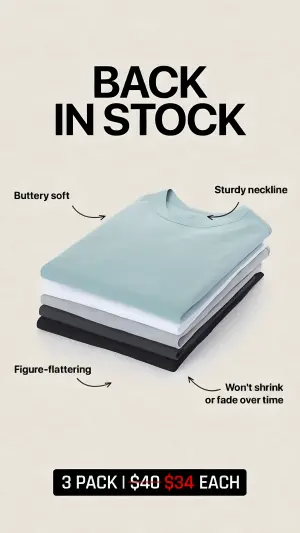
AI Edit Master Prompt
Using the attached image as the layout reference: keep the off-white background, an oversized bold caps two-line headline at the top, the product stacked at a slight angle in the centre, four short labels in the corners each with a small hand-drawn curved arrow pointing at the stack, and a black bar across the bottom with a struck-through price beside a red price. Replace the product with {YOUR PRODUCT STACKED IN ITS COLOUR RANGE}. Set the headline to "{THE HOOK}", the labels to "{FOUR FEATURES}", and the bottom bar to "{PACK SIZE} | {WAS} {NOW} EACH".Reference 13
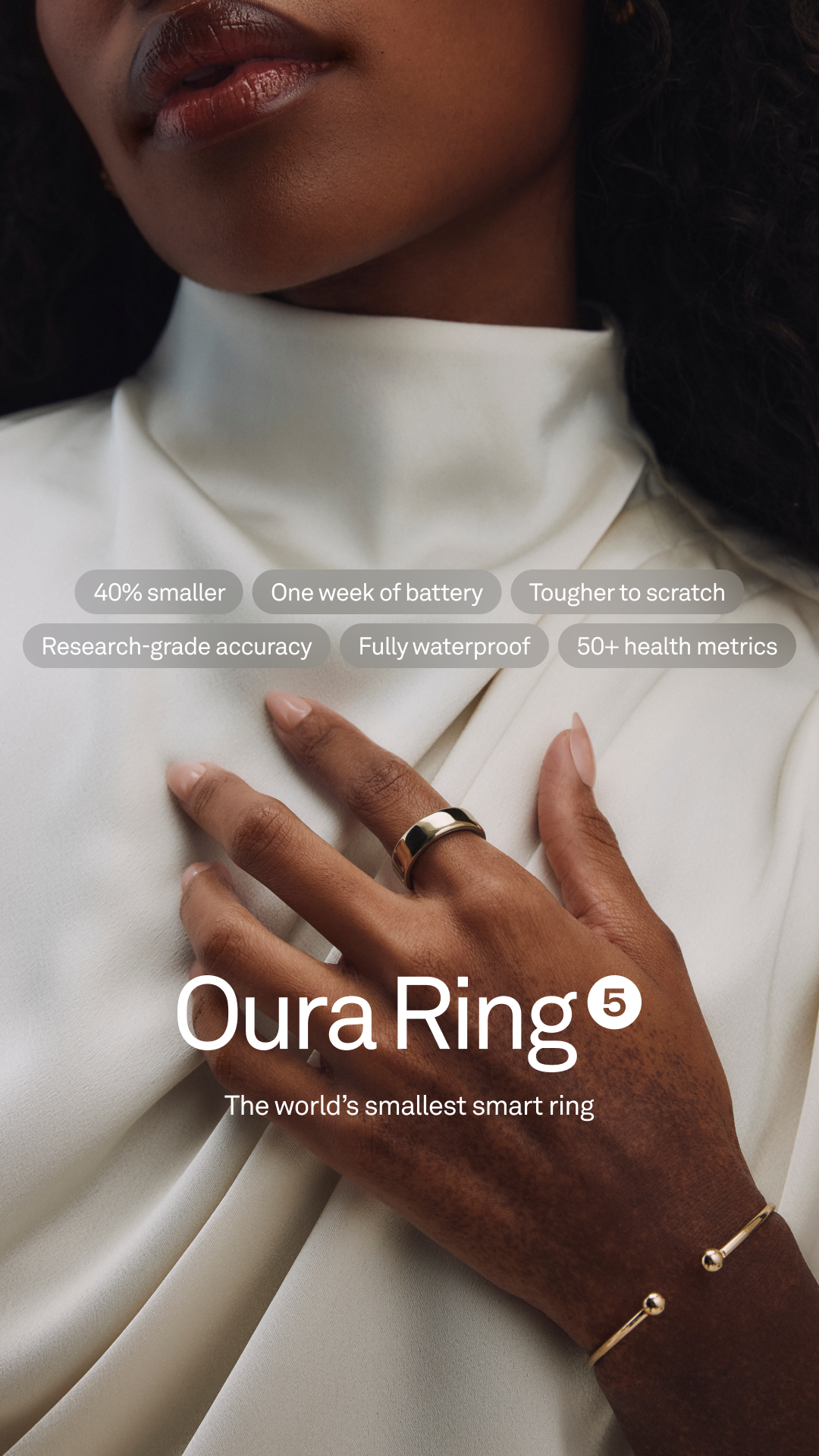
AI Edit Master Prompt
Using the attached image as the layout reference: keep the tall, softly lit editorial photograph cropped close on a model from lips to chest, wearing a draped ivory satin top with a high folded neckline, one hand resting flat on the chest wearing the product, with a thin cuff bracelet at the wrist, in muted warm tones with shallow depth of field. Across the middle of the frame keep two centred rows of translucent grey rounded pill tags with small white regular-weight text, three pills per row. Over the lower third keep a large white sans-serif wordmark centred with a small circled number beside it, and a one-line white tagline beneath. Replace the product with {YOUR PRODUCT} and the model with {YOUR MODEL}. Set the six pills to "{SIX SHORT FEATURES}", the wordmark to "{YOUR PRODUCT NAME}" with "{THE VERSION NUMBER}", and the tagline to "{THE POSITIONING LINE}".Reference 14
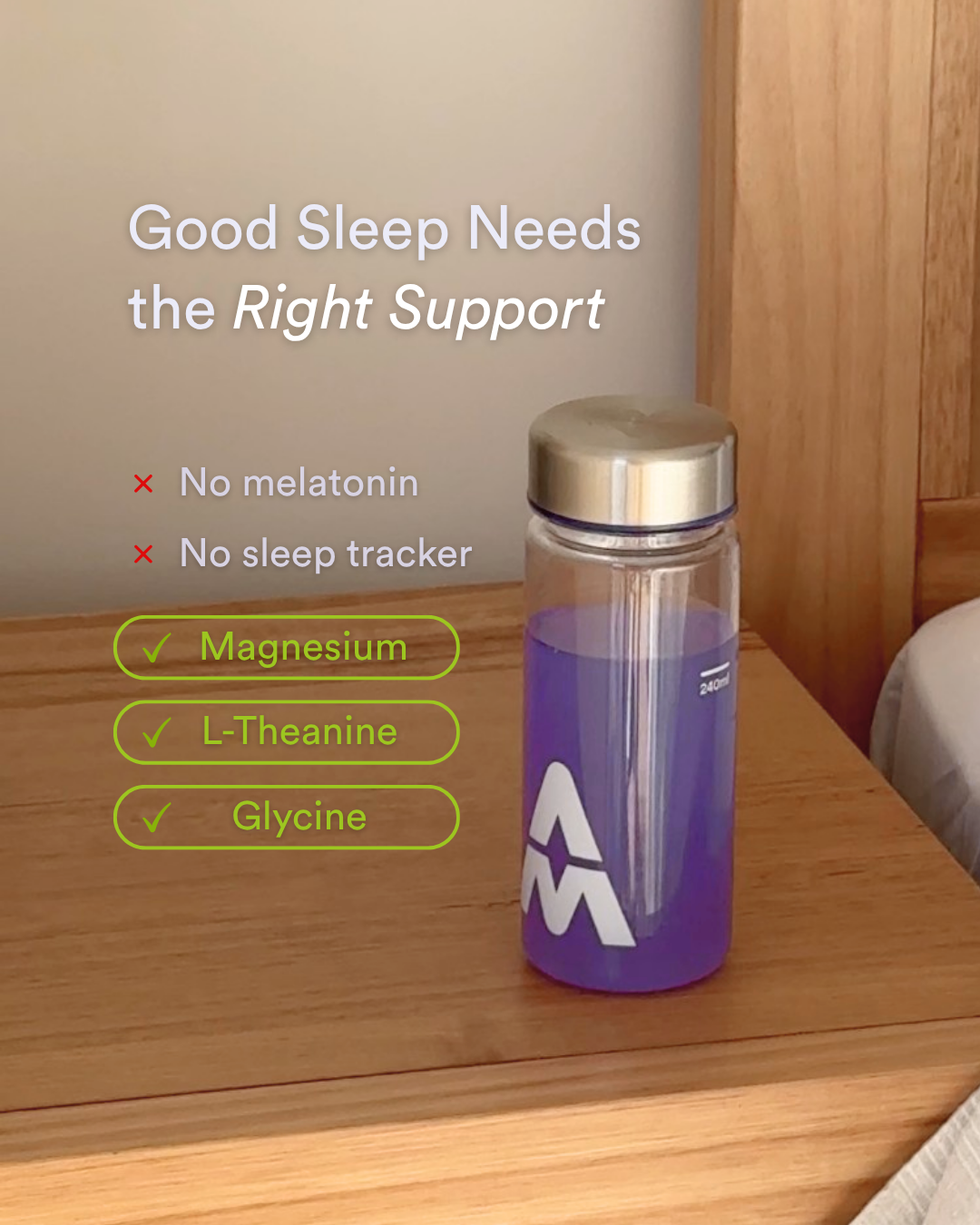
AI Edit Master Prompt
Using the attached image as the layout reference: keep the casual photograph of a warm-toned wooden bedside table against a pale wall in soft evening light, with the edge of a bed and bedding visible on the right, and the product standing on the table on the right side of the frame. On the left keep a two-line headline in light grey sans-serif with the last two words in italic, beneath it two short lines each opened by a small red cross, and below those three stacked rounded outline pills in a bright lime accent, each holding a tick and one ingredient or feature in the same colour. Replace the product with {YOUR PRODUCT}. Set the headline to "{THE NEED} {THE ITALIC PHRASE}", the crossed lines to "{TWO THINGS IT DOESN'T CONTAIN OR NEED}", and the three pills to "{THREE KEY INGREDIENTS OR FEATURES}".Reference 15
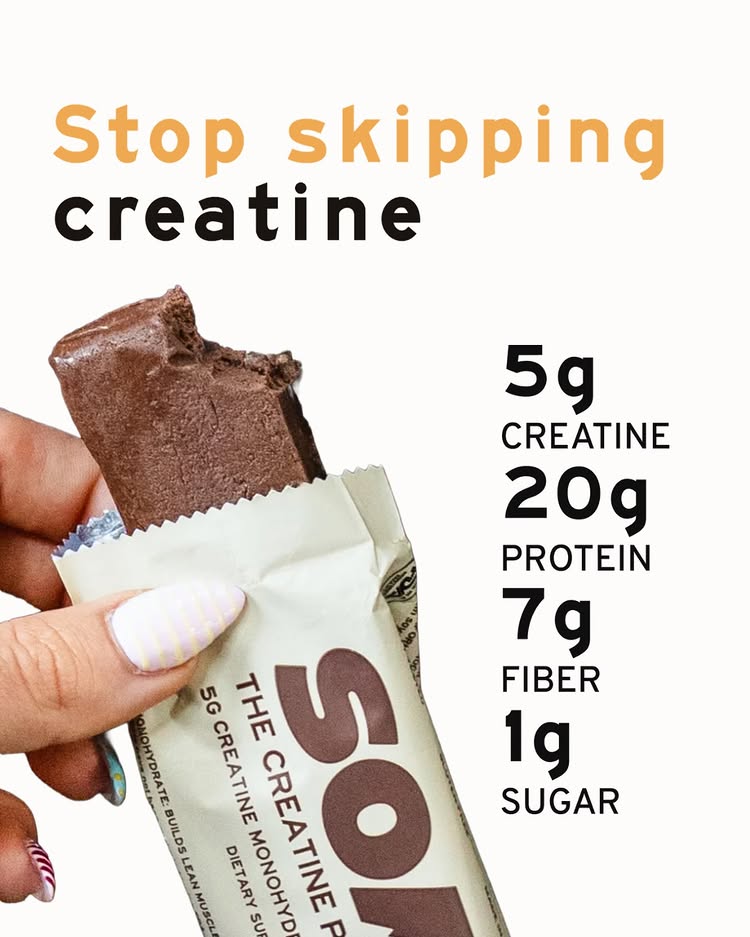
AI Edit Master Prompt
Using the attached image as the layout reference: keep the plain off-white background, a two-line bold headline in the upper left with the first line in a warm accent colour and the second in black, and a real hand entering from the lower left holding the product half-unwrapped with a bite taken out of it, the wrapper folded back. On the right keep a vertical stack of four bold black figures, each large number followed by a unit and a small all-caps label beneath. Replace the product with {YOUR PRODUCT}. Set the headline to "{THE HABIT TO STOP}" in the accent colour and "{WHAT THEY'RE MISSING}" in black, and the four stats to "{FOUR KEY NUMBERS WITH UNITS}" with "{FOUR MATCHING LABELS}".Reference 16
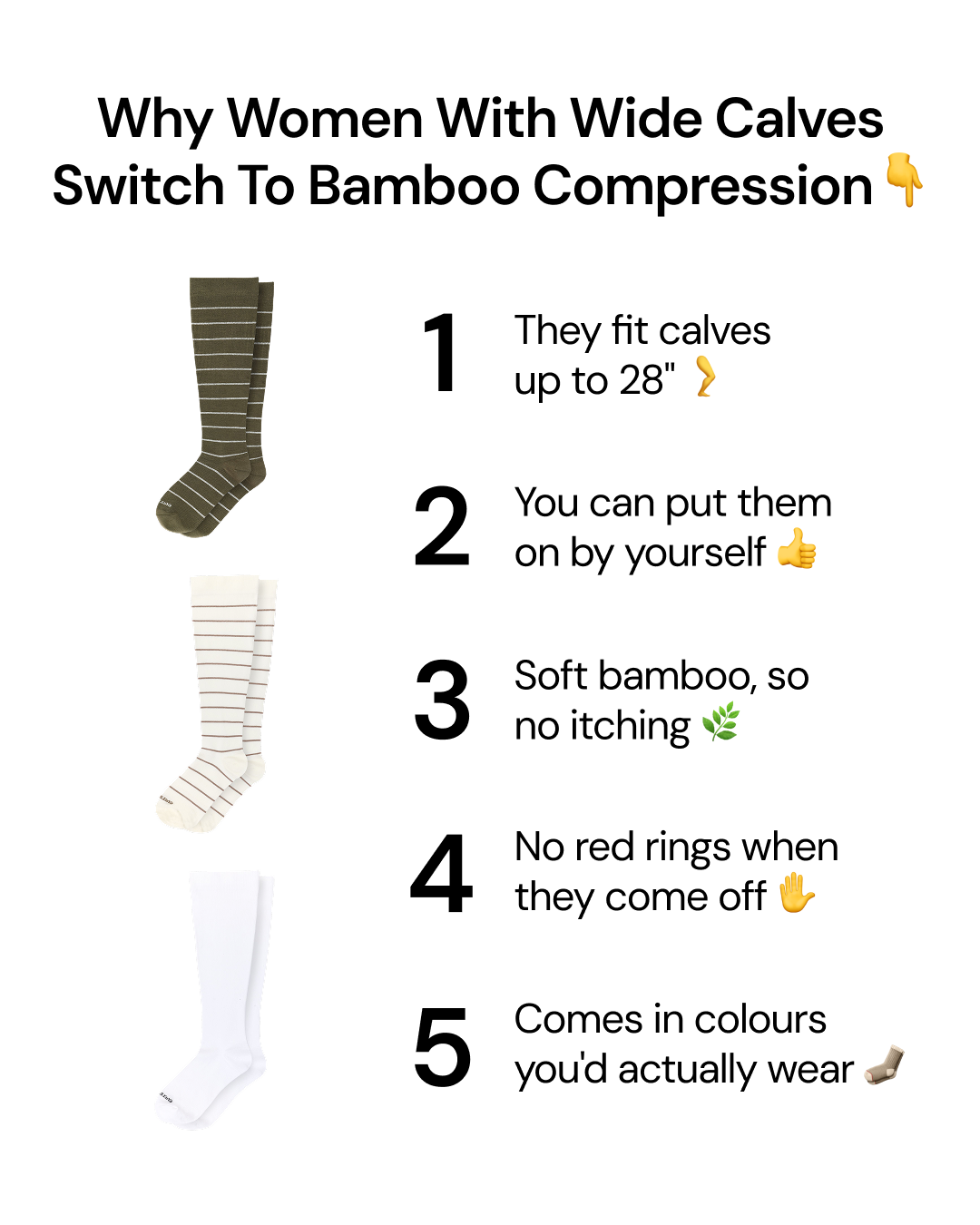
AI Edit Master Prompt
Using the attached image as the layout reference: keep the plain white background, a bold black two-line centred headline at the top ending in a pointing-down emoji, and beneath it two columns: on the left a vertical stack of three product variants photographed as clean cut-outs in different colours, and on the right a numbered list of five items, each with a very large bold black numeral and a two-line reason in regular black text ending in a relevant emoji. Replace the products with {YOUR PRODUCT VARIANTS}. Set the headline to "{WHY THE AUDIENCE SWITCHES TO YOUR PRODUCT}", and the five reasons to "{FIVE REASONS}" with "{FIVE MATCHING EMOJIS}".